The research activity categories in "e-portfolio" of HIRAKU-PF are based on those used in "researchmap." Since March 2023, your research activity data can be automatically updated through integration with "researchmap." (Currently, this automatic update feature is enabled for only four categories of research activities: "Published Papers", "Lecture/Oral Presentation", "Publication", and "MISC".)
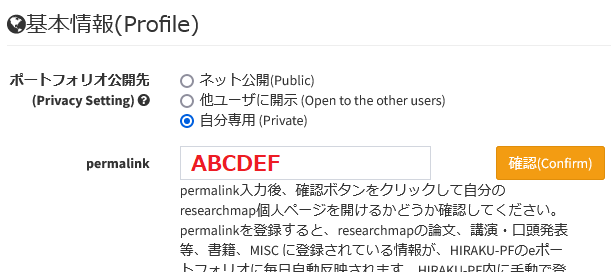
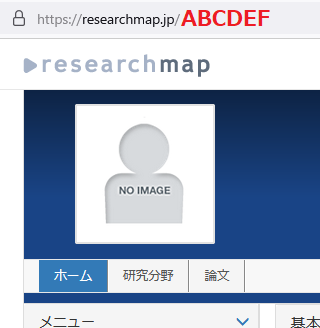
Please enter the "permalink" portion of your "My Portal URL" of "researchmap" into the "permalink" input field. (The "permalink" portion is the section shown in red text in the image on the right.)
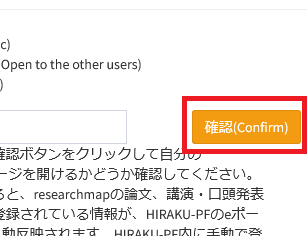
Next, please click the "Confirm" button to verify that you can navigate to your "My Portal" in "researchmap," then click the "Update" button at the bottom to save your e-portfolio and complete the setup. (Please note that HIRAKU-PF requires you to click "Confirm" before you click "Update" and save.)
As a result, your research activities in researchmap will be automatically synced to your HIRAKU-PF e-portfolio every day at midnight. If a permalink is modified or deleted, the associated data will be removed from HIRAKU-PF at midnight on the following day.
注意点 / Notes
連携されるのは、researchmapで『公開』したデータのみ / Only data set to "Public" on researchmap will be synchronized.
自動連携される研究業績は、researchmapで『公開』設定されたものに限定されます。
Only research activities that are set to "Public" in researchmap will be automatically synchronized.
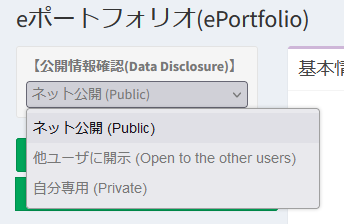
自動連携されたデータは『ネット公開』設定になる / Data automatically synchronized is set to "Public."
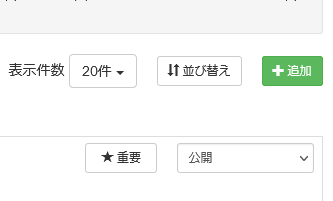
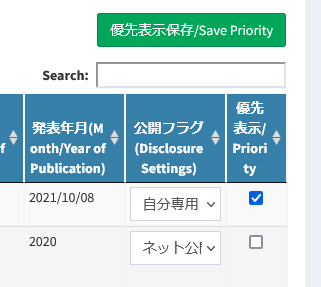
Research activities set to "Public" on researchmap and automatically linked will also be set to"Public" on HIRAKU-PF. In addition, regardless of the "★Major" (displayed with priority) setting in researchmap, all automatically synchronized activities will be marked as "Priority" in HIRAKU-PF. After configuring this automatic data sync. function, please be sure to verify these disclosure settings on HIRAKU-PF and reconfigure them if necessary.
自動連携されたデータは、編集を行えない / Data synchronized automatically cannot be edited.
Research activities automatically linked from researchmap cannot be edited within HIRAKU-PF or via Excel files. You can only configure the "Disclosure Settings" and "Priority" settings on "Edit ePortfolio" > "Research Activities."
FAQ
本機能に関する特記事項はございません。eポートフォリオ全般に関するFAQは以下からご確認ください。
There are no special remarks for this function. Please check the link below for general FAQs regarding e-portfolio function.
HIRAKU-PF システム管理 / HIRAKU-PF System Support E-mail: info■hirakupf.hiroshima-u.ac.jp *■は半角の@に変換してください / Please replace ■ with @.
広島大学グローバルキャリアデザインセンター / Global Career Design Center, HU 電話番号 / TEL: 082-424-4564 E-mail: wakateyousei■office.hiroshima-u.ac.jp *■は半角の@に変換してください / Please replace ■ with @.

 Home
Home