Home
Home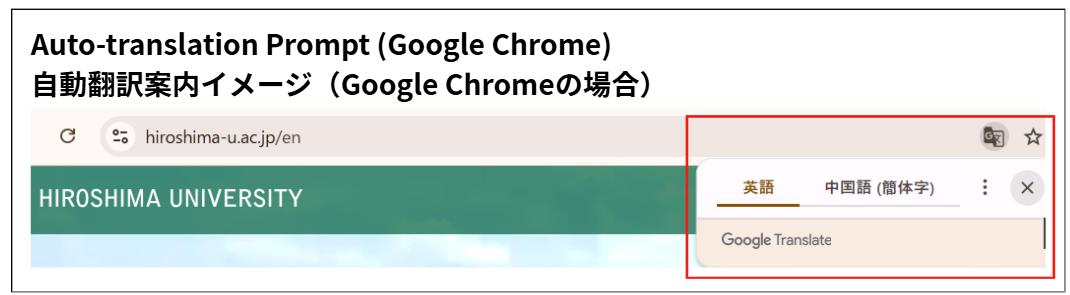
When viewing Hiroshima University’s official Japanese or English website, users may utilize the translation functions available in their respective web browsers.
広島大学公式ウェブサイトの日本語サイトまたは英語サイトを表示した状態で、各ブラウザに備わっている翻訳機能をご利用いただくことが可能です。
When viewing a Hiroshima University webpage written in a different language, a translation prompt may appear automatically.
ブラウザの表示言語と異なる言語のページを開いた際、翻訳案内が自動的に表示される場合があります。
Even if it does not appear, translation functions may still be available from the settings menu, address bar, or other browser controls.
表示されない場合でも、各ブラウザの設定メニューやアドレスバー等から翻訳機能を利用できる場合があります。
Important Notes/重要なお知らせ
Translation functions may not appear depending on browser type, version, device environment, settings, or page structure.
ブラウザの種類・バージョン、端末環境、設定状況、ページ構成等により、翻訳機能が表示されない場合があります。
Automatic translations are machine-generated and may not always be accurate.
自動翻訳は機械的に処理されるため、内容が必ずしも正確であるとは限りません。
For important information such as admissions details, please refer to the original Japanese or English text.
入試情報等の重要事項については、必ず日本語または英語サイトの原文をご確認ください。
How to Use Translation in Major Browsers/主なブラウザでの利用方法
Menu names and button locations may vary depending on the browser version, settings, and device environment. For the latest information, please refer to the help pages of each browser.
表示名やボタン位置は、ブラウザのバージョンや設定、端末環境により異なる場合があります。最新の情報は、各ブラウザのヘルプページ等をご確認ください。
Google Chrome (PC / Smartphone)
▶Official help pages
- PC
Use the translation icon in the address bar or right-click and select “Translate.”
アドレスバー右側の翻訳アイコン、または右クリックメニューから翻訳できます。 - Smartphone (iPhone / Android)
A translation prompt may appear when loading the page. Alternatively, select “Translate” from the browser menu.
ページ表示時に翻訳案内が表示される場合があります。メニュー(︙)から「翻訳」を選択できる場合があります。
Microsoft Edge (PC / Smartphone)
▶ Official help pages
- PC
A translation prompt may appear automatically. If not, use the translation icon in the address bar.
ページを開いた際に翻訳案内が表示されることがあります。表示されない場合はアドレスバーの翻訳アイコンをご利用ください。 - Smartphone
Check for a translation pop-up or the “Translate” option in the browser menu.
翻訳ポップアップまたはブラウザメニューの「翻訳」をご確認ください。
Safari (PC / iPhone)
▶ Official help pages Mac/iPhone
※The languages available in Safari’s translation feature may vary depending on the user’s environment and language support.
Safari の翻訳機能で利用できる言語は、利用環境や対応状況により異なる場合があります。
- PC
Use the translation button near the address bar.
アドレスバー付近の翻訳ボタンから翻訳できます。 - iPhone
In Safari on iPhone, you can translate the page from the Page Menu button.
Safari(iPhone)では、ページメニューボタンからページを翻訳できます。